

Moving a Dallas-Fort Worth business to the cloud is rarely a single weekend project, and the teams that treat it that way usually pay for it in downtime, surprise bills, and broken integrations. A working plan sequences workloads, locks down identity, and protects every line-of-business application before the first server is touched.
TLC has guided DFW companies through Azure, Microsoft 365, and hybrid cloud rollouts across legal, healthcare, finance, and professional services engagements. This step-by-step planning guide walks through the migration phases that actually work, the audit and security work that has to happen first, and the cost levers that decide whether your move pays back.
If your team is still weighing whether cloud adoption makes sense at all, Cloud Services Consulting Denton TX can help you map the right mix of on-prem, hybrid, and cloud tools before any migration work begins.
Key Takeaways
- A successful Dallas-Fort Worth cloud migration starts with an application and data audit that classifies every workload as move, retire, or keep on-prem.
- Most DFW migrations land in a hybrid pattern, with identity, networking, and selected workloads kept on-premises while the rest move to Azure, AWS, or Google Cloud.
- Backup and disaster recovery in the cloud are shared-responsibility design decisions, not defaults. RTO, RPO, retention, and failover testing must be documented before cutover.
- DFW is the #2 North American data center market with 575 MW of H1 2025 net absorption per JLL, giving local businesses dense cloud onramp options in Plano, Irving, Red Oak, and Midlothian.
Why Cloud Migration Looks Different in Dallas-Fort Worth
DFW is not a generic mid-market region for cloud projects, and ignoring its specifics costs real money. Dallas-Fort Worth remains the No.
2 data center market in North America, according to research from JLL, with net absorption for the first half of 2025 reaching 575 MW in DFW, and that growth shapes the carrier ecosystem, the available cloud onramps, and even the local talent pool of engineers who have done a migration before.
That density matters because it puts AWS, Azure, and Google Cloud onramps within tens of miles of most DFW offices. Plano, Irving, Red Oak, and Midlothian all host carrier-neutral facilities that local businesses can connect to with low-latency private circuits, often at lower power cost than equivalent connectivity in other primary U.S. market
s.
The other DFW reality is the Microsoft footprint across enterprise IT. Most metroplex IT shops are already running Microsoft 365, Entra ID, and some flavor of Azure, which shapes the technical path far more than vendor-neutral playbooks suggest and which makes Azure the path of least resistance for identity and Windows workloads.
Layer on top of that a heavy concentration of regulated industries, including healthcare around the Medical District, legal in downtown Dallas, and financial services in Plano and Fort Worth. Each carries its own compliance overlay that influences region choice, data residency, and the security baseline you can defend during an audit.
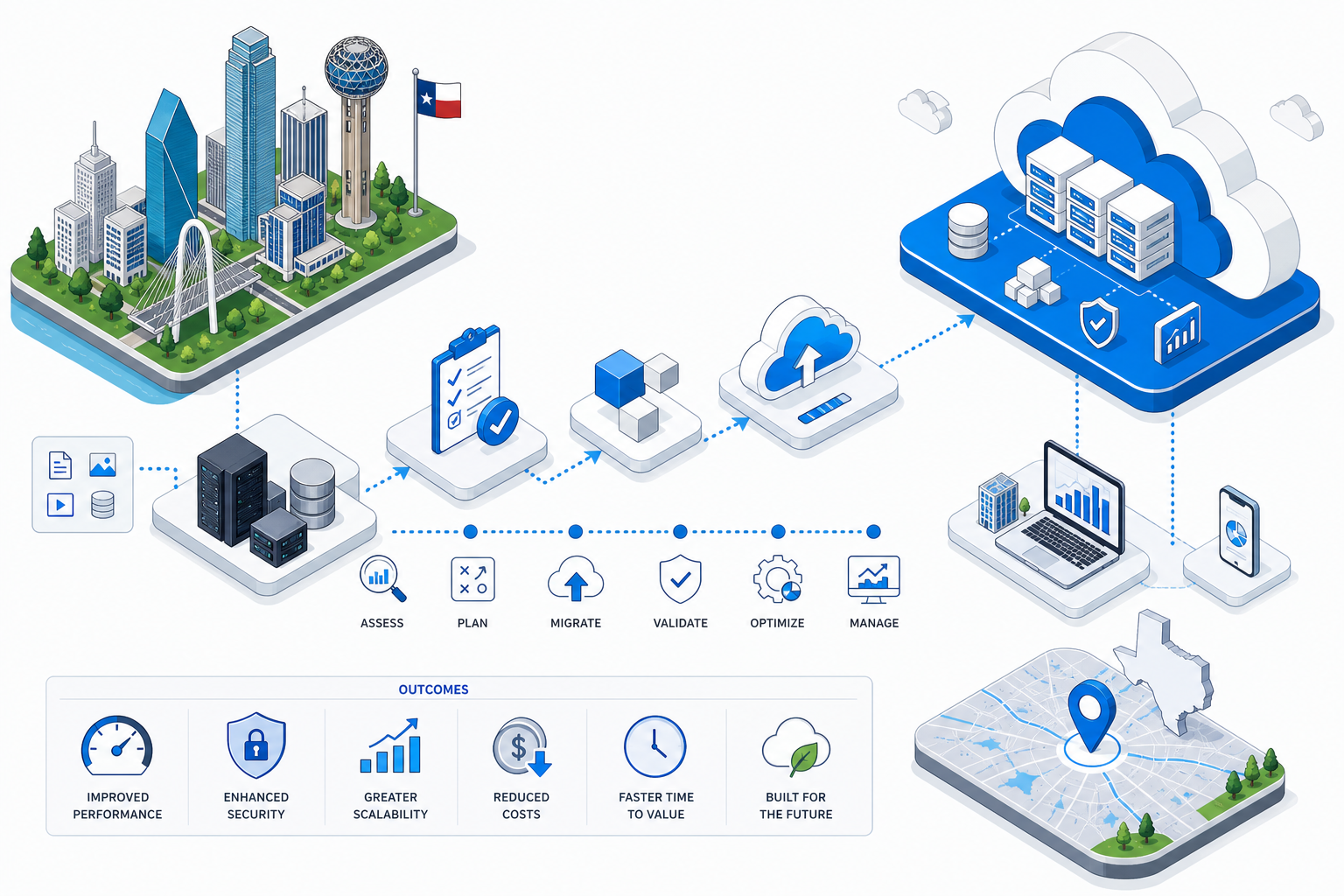
DFW Cloud Migration Readiness Checklist
- ✓Pre-migration application and data audit completed: Yes / No
- ✓Workload migration schedule and dependencies mapped: Yes / No
- ✓Backup, disaster recovery, and risk plan documented: Yes / No
- ✓Hybrid and on-premises integration points designed: Yes / No
- ✓Security controls aligned with NIST-style framework: Yes / No
- ✓Microsoft 365 / Azure tenant readiness verified: Yes / No
- ✓TCO and ongoing cost optimization plan in place: Yes / No
- ✓Local data center / cloud onramp strategy chosen (Plano, Irving, Red Oak, Midlothian): Yes / No
Sources: TLC field experience with DFW cloud migrations; JLL North America Data Center Report, Midyear 2025 (DFW H1 2025 net absorption of 575 MW).
Phase 1: Pre-Migration Audit and Workload Classification
Every credible DFW migration starts with a readiness assessment of servers, applications, data stores, and user access. Skipping this step is the most reliable way to discover a forgotten SQL Server dependency late on cutover night, after the team has already burned through the migration window.
The audit inventories each workload, the data it depends on, and the users and integrations that touch it. Each workload then gets a disposition: move as-is, refactor, retire, or keep on-premises for compliance, latency, or licensing reasons, and that disposition drives every downstream decision in the project.
For a typical 75-user professional services firm in Dallas, the audit usually turns up 40 to 80 distinct applications once shadow IT and SaaS tools are counted. A surprising share of those tools end up retired before any migration spend is committed, which is often where the project quietly pays for itself.
The audit should also capture identity sources, on-prem Active Directory health, certificate inventories, line-of-business app vendors, and any legacy authentication methods still in use. These are the items that trip up DFW migrations most often when they are discovered after the schedule has already been published to the business.
Phase 2: Mapping Dependencies and Building the Schedule
A phased schedule sequences workloads by business priority, technical dependency, and risk. Order matters because moving a workload before its identity provider, its database, or its file share is online creates an outage that did not have to happen.
Most DFW migrations break into sprint-level milestones across 8 to 16 weeks for a 50 to 200 user environment. Each sprint owns a defined set of users, applications, or data, with named owners on the business and IT sides and a clear definition of done.
The schedule also has to account for blackout windows around payroll runs, month-end close, tax filing deadlines, and major client deliverables. A migration that lands on top of a 10-K filing, an open enrollment, or a quarterly close gets remembered for the wrong reasons by the people who pay your invoice.
Dependency mapping is what makes the schedule realistic instead of aspirational. A simple application dependency map shows which file shares, databases, identity services, and integrations have to move together, which is far more useful than a flat list of servers and far more honest about the work involved.

Phase 3: Designing Backup, Disaster Recovery, and Security
DFW migration leads are blunt about one point: cloud platforms do not automatically back up your data the way most business owners assume. Backup, retention, and DR are shared-responsibility design decisions you own as the customer, not defaults that ship with the subscription.
A complete plan documents recovery time objectives, recovery point objectives, retention windows, and a failover testing cadence. For a healthcare or finance workload in DFW, a 4-hour RTO with a 15-minute RPO is a common baseline, and the plan should be tested at least twice a year against a realistic scenario.
Security controls should map to a NIST-aligned framework, with conditional access, endpoint security, a tenant baseline, and continuous monitoring all defined before users move. This pattern is flagged as a 2025 DFW trend alongside multi-cloud environments and locally responsive SLAs, especially for healthcare, legal, and finance workloads.
Backup of Microsoft 365 itself is the gap most often missed in DFW migration planning. Mailboxes, OneDrive, SharePoint, and Teams data need a third-party backup target if your retention or recovery requirements exceed what native policies provide, which they almost always do in regulated environments.
Phase 4: Hybrid Integration and Microsoft 365 / Azure Cutover
Most DFW small and mid-size businesses cannot lift-and-shift everything at once, which is why hybrid is the standard posture in the metroplex rather than the exception. Identity, networking, and application-to-application connections between the cloud tenant and any retained on-prem systems have to be explicitly designed and tested before users move.
For the Microsoft-centric stack that dominates DFW enterprise IT, mailbox, OneDrive, SharePoint, Teams, and Active Directory cutovers belong on a single calendar. Identity and conditional access should be provisioned before the first user is moved, not after the first support ticket, and MFA enforcement should be staged with the user waves rather than applied all at once.
A clean Microsoft 365 cutover for a 150-user Fort Worth firm typically runs in 3 to 5 waves of 30 to 50 users each. Every wave gets a pre-flight check, a cutover window, and a 48-hour hypercare period before the next wave starts, which keeps the help desk volume manageable.
Networking is the silent killer of hybrid projects. Site-to-site VPN, ExpressRoute, or SD-WAN circuits between your DFW offices and the Azure region need to be provisioned and tested at least two weeks before the first production workload moves, with bandwidth and latency baselines captured for comparison.
Phase 5: TCO Modeling and Ongoing Cost Optimization
DFW providers warn repeatedly that lift-and-shift without cost governance erases the ROI the project was supposed to deliver. Cloud spend behaves nothing like on-prem capex, and a workload that ran on a paid-off server can cost more in the cloud if it is sized for peak load instead of average.
A real TCO model compares on-prem and cloud across compute, storage, licensing, networking, backup, support, and staff time. It also estimates peak-usage compute and storage so you do not get surprised the first time a quarterly job, a marketing campaign, or a year-end batch run hits the new environment.
Rightsizing, reserved capacity, autoscaling, and tag-based showback are the levers that hold cost in check after cutover. Without them, the average DFW migration sees cloud spend drift up 20 to 40 percent in the first 12 months, often without any new workloads being added.
Cost governance is also organizational, not just technical. Someone has to own a monthly cost review, someone has to approve new subscriptions, and someone has to retire idle resources, or the spend creeps regardless of how well the architecture was designed at cutover.
Choosing a Cloud Migration Partner in Dallas-Fort Worth
A good DFW cloud migration partner is fluent in Azure and Microsoft 365, has a documented migration playbook, and can show named references from comparable local businesses. Ask to see a sample schedule, a sample DR plan, and a redacted TCO model from a recent engagement before you sign anything.
Local presence still matters in DFW. A partner who can put engineers on-site in Plano, Irving, Fort Worth, or downtown Dallas during cutover weekends will resolve issues faster than a remote-only team, especially when network changes, badge access, or third-party vendor coordination are involved.
Finally, ask how the partner handles week 13. The migration is not done at cutover, and the work of monitoring, cost governance, security tuning, and ongoing user support is where most of the long-term value gets delivered or quietly lost.
Frequently Asked Questions
How long does a typical cloud migration take for a Dallas-Fort Worth business?
For a 50 to 200 user DFW firm, a Microsoft 365 and Azure migration typically runs 8 to 16 weeks from kickoff to the last cutover wave. Larger or more regulated environments, especially in healthcare and finance, can extend to 6 months when DR, compliance, and integration testing are included in scope.
Should our DFW business choose Azure, AWS, or Google Cloud?
Most DFW enterprise IT shops already run on Microsoft 365 and Entra ID, which makes Azure the path of least resistance for identity, file services, and Windows workloads. AWS and Google Cloud remain strong choices for data analytics, custom application workloads, or when an existing vendor relationship dictates the platform, and a multi-cloud pattern is increasingly common in the metroplex.
Will our data be backed up automatically once it is in the cloud?
No. Cloud platforms operate on a shared-responsibility model, which means you are responsible for backup configuration, retention, and recovery testing for your data, mailboxes, and SaaS content, and a third-party backup tool is almost always required for Microsoft 365 in regulated industries.
Can we keep some systems on-premises after migrating?
Yes, and most DFW businesses do exactly that. Hybrid setups that keep specific workloads on-prem for compliance, latency, or licensing reasons are the standard pattern in the metroplex, with identity and networking designed to bridge the two environments cleanly.
How do we keep cloud costs from spiraling after migration?
Cost governance has to be part of the migration plan, not an afterthought. Rightsizing, reserved or savings-plan commitments, autoscaling, monthly tag-based cost reviews, and a clear owner for every subscription are what keep the bill predictable over the long term.
Which Dallas-Fort Worth industries face the toughest migration requirements?
Healthcare, legal, and financial services workloads carry the heaviest compliance and security overhead, including HIPAA, FINRA, and state privacy requirements. Those environments typically need longer planning windows, more detailed DR testing, and a NIST-aligned tenant baseline before any user is moved.

About the author
Matt Forman - Owner & Chief Techie
Matt Forman is the Owner and Chief Techie at Local Circuit, a Denton, Texas-based managed service provider he leads in delivering small-business technology management and security. For over 15 years, his team has worked alongside small businesses, local municipalities, law firms, and first-responder agencies as their trusted IT partner.