

When your Denton, TX office network slows to a crawl or drops entirely, every minute of downtime costs productivity and tests your team’s patience. The fastest way back online is a structured troubleshooting process that checks the most common failure points before escalating to outside help.
This guide walks through a practical network troubleshooting checklist built for Denton businesses, from WiFi dead zones and firewall misconfigurations to backup verification and escalation paths to local MSP support.
Key Takeaways
- Continuous network monitoring is the first line of defense, catching latency spikes, packet loss, and device failures before users notice them.
- WiFi dead zones and signal interference are among the most reported networking issues for Denton offices, especially in older buildings with dense wall construction.
- Security tools like firewalls and endpoint protection can themselves cause network disruption when misconfigured, so validation should be part of every troubleshooting sequence.
- Documented escalation to a local Denton MSP with defined response commitments prevents prolonged outages when internal teams exhaust their diagnostic options.
Why Network Troubleshooting Follows a Sequence
Networks fail in predictable patterns, and jumping straight to advanced diagnostics wastes time when the root cause is often a physical layer issue or a recent configuration change. A structured checklist moves from the most common and fastest-to-verify causes toward deeper investigation, reducing mean time to resolution without unnecessary disruption.
For Denton businesses, this sequence also matters because local infrastructure factors like building age, utility construction schedules, and regional weather events can introduce variables that differ from national averages.
Network Troubleshooting Checklist for Denton Businesses
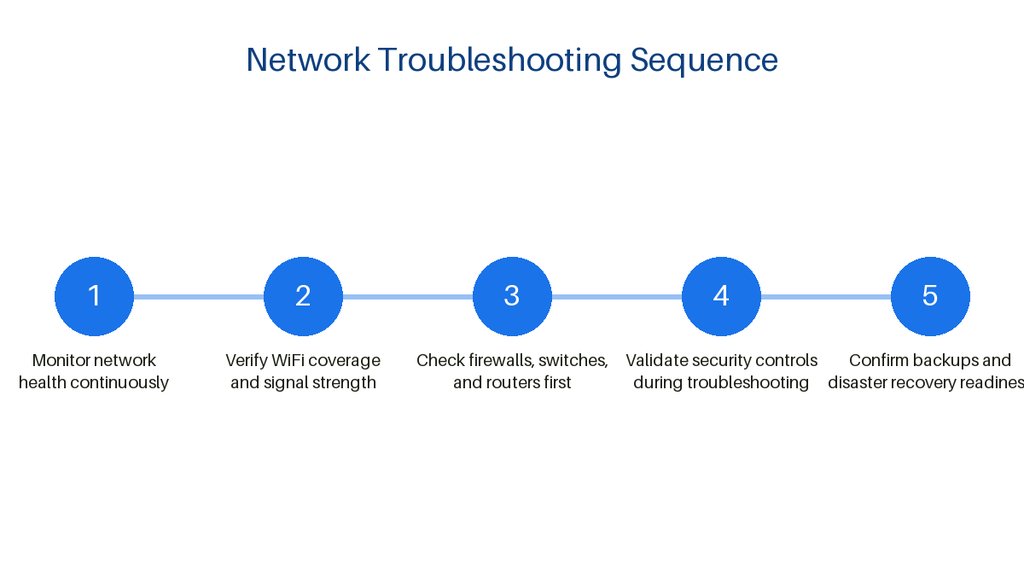
- ✓Implement 24/7 or business-hours network monitoring: First priority: continuous visibility into latency, packet loss, and device status
- ✓Run WiFi signal tests and eliminate dead zones: Verify coverage strength and channel separation across all work areas
- ✓Confirm status of firewalls, switches, and routers: Check hardware health, port errors, and WAN connectivity before software diagnosis
- ✓Validate security tools are not causing disruption: Review firewall rules, endpoint protection logs, and scan schedules for interference
- ✓Verify backup and disaster recovery functionality: Confirm recent backup completion and test restoration capability during incidents
- ✓Document escalation path to local Denton MSP: Define contacts, SLAs, and required diagnostic data before an emergency occurs
Based on common network troubleshooting practices and Denton-area MSP service descriptions.
Step 1: Monitor Network Health Continuously
The first step in any network troubleshooting process is implementing continuous or near-continuous monitoring of critical devices, links, and services. Denton businesses should have either internal monitoring tools or a managed service provider watching latency, packet loss, interface errors, and device availability during business hours at minimum.
Without baseline monitoring, you are troubleshooting blind. You cannot distinguish a sudden failure from a gradual degradation, and you will miss early warning signs like rising retransmission rates or DNS resolution delays that precede total outages.
Step 2: Verify WiFi Coverage and Signal Strength
WiFi dead zones and weak signal strength are persistent problems in Denton business environments, particularly in converted historic buildings downtown or in sprawling single-story office parks where access point placement was never optimized. Running targeted signal tests, checking for channel overlap with neighboring networks, and verifying that access points are not obstructed by new shelving or relocated equipment should be standard practice.
Local networking providers in the Denton area specifically identify WiFi troubleshooting as one of their most frequent service calls, which suggests many businesses attempt to band-aid coverage issues with consumer-grade extenders rather than solving the root cause through proper site survey and access point density.

Step 3: Check Firewalls, Switches, and Routers First
Core network hardware forms the backbone of connectivity, and status verification should always precede software-level diagnosis. Confirm that firewalls show normal operating status, that switch ports are not erroring out due to cable faults or power fluctuations, and that routers have not lost their upstream connection or WAN IP assignment.
Denton managed IT providers include complete network communication support as part of their standard offerings, covering firewalls, wireless infrastructure, switches, routers, and VoIP systems. This reflects the reality that these devices interact in ways that can mask the true failure point, so systematic verification of each layer prevents misdiagnosis.
Step 4: Validate Security Controls During Troubleshooting
Security tools are a common hidden cause of network disruption. A firewall rule pushed in error, an endpoint protection agent blocking legitimate traffic, or a vulnerability scanner overwhelming a segment during business hours can all present as generic network slowness.
Layered security approaches including managed detection and response, endpoint protection, vulnerability scanning, and password management are integral to network operations, but each layer adds potential points of friction.
When troubleshooting, temporarily isolating security tools or reviewing their logs should be done methodically, never by disabling protection entirely. The goal is to identify whether a security control is the proximate cause while maintaining defense in depth against active threats.

Step 5: Confirm Backups and Disaster Recovery Readiness
Network incidents sometimes escalate into data loss events, especially if ransomware or configuration corruption is involved. Verifying that backups completed successfully and that disaster recovery procedures are functional should be part of the troubleshooting checklist, not an afterthought.
Denton MSPs bundle backup and disaster recovery with managed network services, which implies these capabilities should be validated during any significant incident. A business that restores connectivity but discovers its backup jobs have been failing for weeks has traded one crisis for another.
Step 6: Use a Documented Escalation Path to Denton MSPs
When internal troubleshooting exhausts its options, the final step is escalating to a local managed service provider with defined service level agreements and a documented handoff process.
Many Denton businesses find that ongoing Remote IT Support Denton TX resolves recurring network issues before they require full troubleshooting checklists.
The escalation path should be written down before it is needed, including contact methods, priority definitions, and what diagnostic data the internal team should collect first. A frantic phone call at 10 p.m.
goes smoother when everyone knows the protocol.
How The Local Circuit Supports Denton Network Stability
The Local Circuit is a Denton, Texas-based managed service provider that has worked alongside small businesses as their technology partner for over 15 years, handling physical hardware management, help desk support, network security, and cloud productivity services. The company operates with an all-Texas team that handles every project in-house, so Denton businesses have a familiar face on-site and a direct line to the people who built their network.
The Local Circuit offers flat, per-user pricing rather than hourly billing, so costs are known before work starts. Every network project includes a free on-site assessment to map requirements and produce a written scope of work for approval.
The company holds CJIS Certification, is an InfraGard Member, and is Aggie Owned and Operated, with services spanning Denton, Frisco, Plano, Carrollton, Aubrey, Lewisville, Decatur, Sanger, Prosper, Ponder, Gainesville, Whitesboro, and McKinney.
Step 7: Audit Endpoint Behavior and User Activity Patterns
Individual devices often reveal network problems that infrastructure monitoring misses entirely. A single misconfigured laptop or rogue application can degrade performance for an entire Denton office.
Start by reviewing bandwidth consumption per endpoint during peak business hours. Look for unusual spikes that do not align with normal workflows or scheduled operations.
Outdated network drivers frequently cause intermittent connectivity drops that appear random but follow predictable patterns. Update drivers systematically rather than chasing symptoms device by device.
Shadow IT applications installed without IT approval can create unauthorized traffic tunnels and security gaps. Inventory all software running on corporate endpoints quarterly to catch these early.
User behavior analytics help distinguish between genuine technical failures and training-related issues. Repeated password lockouts or failed VPN connections often point to onboarding gaps rather than system faults.
Document recurring endpoint problems by user role and department to identify environmental factors. Certain Denton office layouts or equipment configurations may cluster issues in predictable ways.
Step 8: Test Physical Layer Connections and Environmental Factors
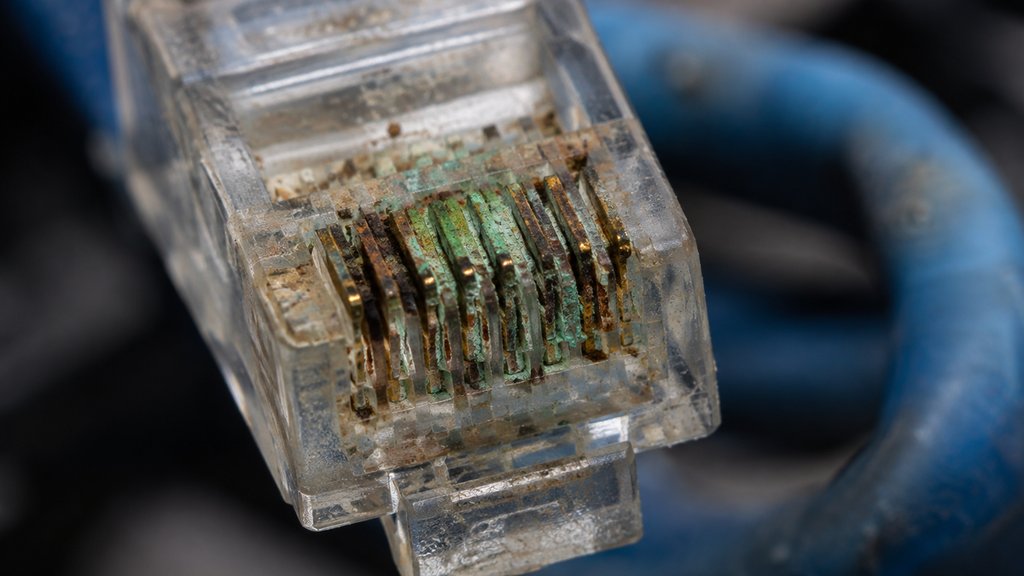
Cabling infrastructure degrades slowly enough that businesses rarely suspect it until failures become severe. Inspect Ethernet runs for pinch points, moisture exposure, and connector corrosion at least annually.
Temperature fluctuations in server closets and wiring cabinets cause thermal expansion that loosens connections over time. Verify that environmental controls maintain stable conditions year-round in Denton variable climate.
Power quality issues including brownouts and electrical noise disrupt network equipment without triggering obvious alarms. Install power monitoring to catch fluctuations that standard UPS units may not log.
Cable certification testing validates that installed wiring still meets performance specifications for current speeds. Older Cat5e runs may physically intact yet fail to reliably support gigabit requirements.
Electromagnetic interference from nearby machinery, LED lighting ballasts, or HVAC systems degrades signal integrity unpredictably. Map interference sources when troubleshooting intermittent performance problems.
Label and photograph cable runs during installation or maintenance to accelerate future troubleshooting. Accurate physical documentation saves hours of tracing lines when Denton businesses need rapid resolution.
Frequently Asked Questions
What is the first thing to check when my Denton office network goes down?
Start with physical layer verification: confirm that routers, switches, and firewalls show normal status lights and that no cables were disturbed. Then check whether the issue is isolated to one device, one segment, or the entire network before moving to deeper diagnosis.
How can I tell if my WiFi problems are caused by interference or insufficient coverage?
Use a WiFi analyzer tool to measure signal strength in dBm across your floor plan and identify channel overlap with neighboring networks. If signal strength drops below -67 dBm in work areas or if multiple networks crowd the same channel, you likely need additional access points or channel reconfiguration rather than just a stronger router.
Should I disable my firewall to test if it is causing network slowness?
Never fully disable a firewall during business hours. Instead, review recent rule changes, check logs for blocked legitimate traffic, and consider temporarily relaxing a specific rule while monitoring closely.
If you are not confident in this process, escalate to a qualified network technician.
What information should I gather before calling an MSP for network support?
Collect the time the issue started, which users or devices are affected, any recent changes to hardware or software, error messages or logs, and what troubleshooting steps you have already attempted. This lets the MSP respond faster and avoids repeating work you have already done.
How often should Denton businesses test their backup and disaster recovery procedures?
Test backup restoration at least quarterly and verify that critical data can be recovered within your business’s maximum tolerable downtime. A backup that has never been restored is a hope, not a plan, and many businesses discover corruption or gaps only during an actual emergency.
Can old Ethernet cabling cause network slowdowns even if devices still connect?
Yes. Cabling that appears functional may not reliably support modern speeds.
Certification testing reveals whether installed wiring meets current performance specifications or needs replacement.

About the author
Matt Forman - Owner & Chief Techie
Matt Forman is the Owner and Chief Techie at Local Circuit, a Denton, Texas-based managed service provider he leads in delivering small-business technology management and security. For over 15 years, his team has worked alongside small businesses, local municipalities, law firms, and first-responder agencies as their trusted IT partner.