
A severe storm rolls through Denton on a Tuesday night, knocks out power for 14 hours, and floods the server closet at your office on University Drive. By Wednesday morning, your team needs patient records, POS data, or accounting files, and whether they can get them is decided weeks earlier in a document called a disaster recovery plan.
TLC has helped North Texas small businesses build and test DR plans through tornado outbreaks, ransomware incidents, and the everyday hardware failures that still account for most outages. This guide walks through how to scope, document, and test a disaster recovery plan for a Denton small business, including the specific RTO, RPO, backup, and testing decisions that most owners get wrong on the first pass.
Key Takeaways
- A real DR program is two coordinated documents: a business continuity plan that keeps operations running and an IT disaster recovery plan that restores systems and data on a defined timeline.
- Recovery Time Objective (RTO) and Recovery Point Objective (RPO) must be set per critical app, not as a single company-wide number, or the design will either overspend or under-protect.
- The 3-2-1 rule remains the floor for backups: three copies, two media types, one offsite or cloud, with at least one copy immutable to survive ransomware.
- A DR plan that has never been tested is a guess, so run a full restore drill at least annually and after any major infrastructure or staff change.
Why Denton Small Businesses Need a DR Plan That Actually Works
North Texas runs on volatile weather. The National Weather Service has documented frequent tornado watches, severe thunderstorms, and flash flood events across Denton County, and the largest hailstone ever recorded by NWS in the Dallas-Fort Worth area, 5.9 inches in diameter, fell in Sanger in June 2023
.
On top of natural disasters, Denton small businesses face the same digital threats as every other SMB in the country: ransomware, accidental deletion, hardware failure, and provider outages. FEMA estimates roughly 25 percent of businesses never reopen after a major disaster, and industry surveys put the share of small businesses without any disaster recovery plan at up to 75 percent.
The math is simple. A plan you build before the storm or the encryption event determines whether your accounting firm, dental practice, or distributor is back in business by Wednesday or out of business by next quarter.
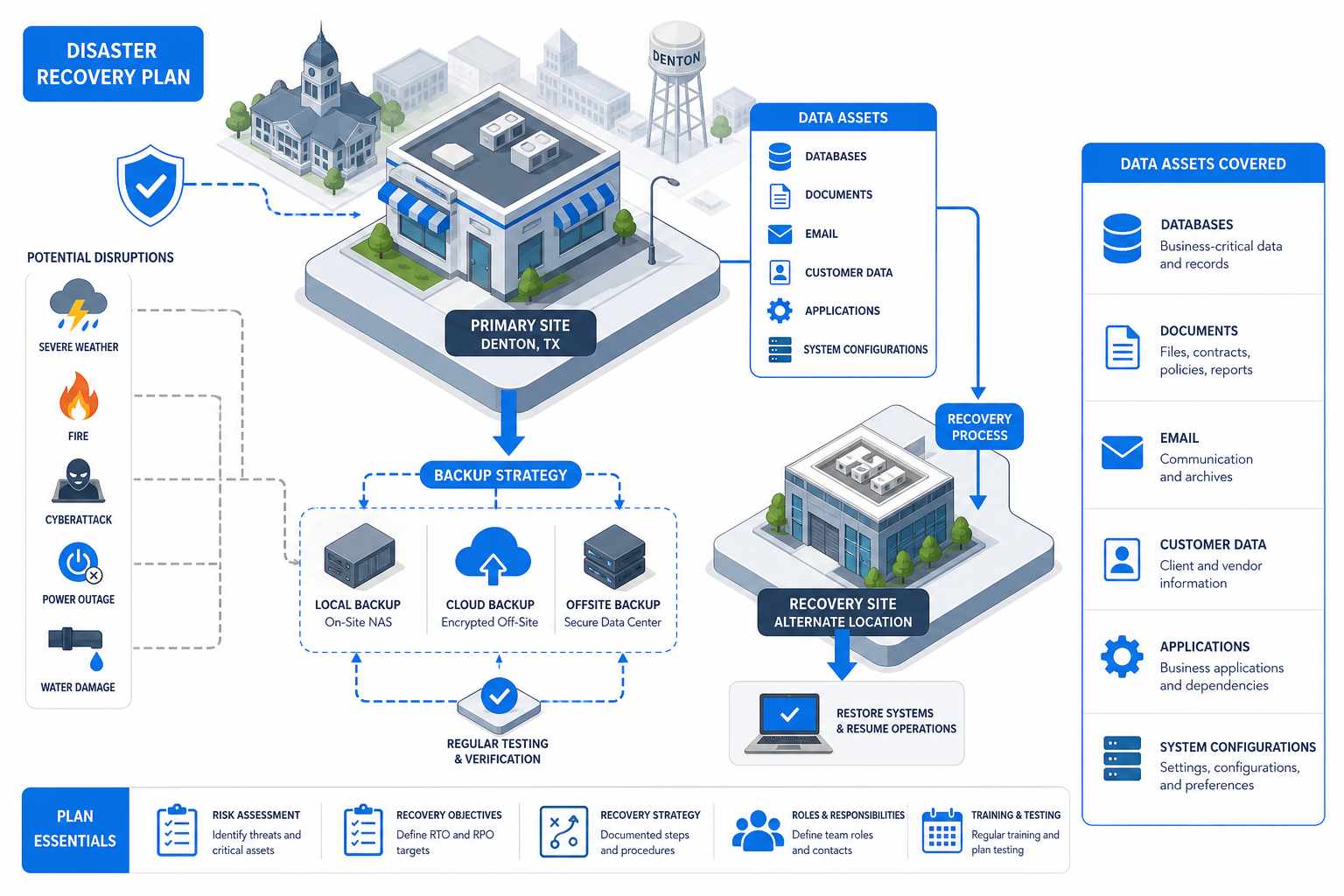
Denton Small Business Disaster Recovery Readiness Checklist
- ✓Documented BCP and IT DRP on file – Two separate, coordinated documents reviewed annually
- ✓Defined RTO and RPO per critical app – POS, accounting, EHR or practice management, file shares, email
- ✓Layered backup strategy (3-2-1) – 3 copies, 2 media types, 1 offsite or cloud, 1 immutable
- ✓Local image backup plus cloud/offsite backup – All Denton servers and key endpoints protected by both
- ✓Full DR test cadence – At least once per year and after any major infra or staff change
- ✓Denton specific risk register – Severe storms, tornadoes, flooding, power, internet, suppliers, remote staff
- ✓Tier 1 RTO/RPO benchmark – RTO under 4 hours, RPO under 1 hour
- ✓Tier 2 RTO/RPO benchmark – RTO same business day, RPO under 4 hours
- ✓Tier 3 RTO/RPO benchmark – RTO 24 to 72 hours, RPO 24 hours
- ✓DR documentation accessible offline – Printed runbook plus cloud copy with vendor contacts and license keys
- ✓Immutable backup copy for ransomware – Object lock, write once cloud, or offline rotating media
Benchmarks aligned with NIST SP 800-34 contingency planning guidance and common SMB DR practice. Validate targets against your own business impact analysis.
Business Continuity vs. IT Disaster Recovery: Two Documents, One Goal
A business continuity plan (BCP) describes how the company keeps operating when something goes wrong. It covers staffing, customer communication, alternate work locations, vendor backups, cash access, and any manual workarounds your team can use while systems are down.
An IT disaster recovery plan (DRP) is narrower and more technical. It defines how IT systems, data, and applications get restored, in what order, by whom, and within what time and data-loss targets.
Denton small businesses need both, and the two documents have to reference each other. If the BCP promises customers a 4 hour callback window, the DRP must restore the phone system and CRM inside that window, or both plans are fiction.
Treat the BCP as a leadership and operations document and the DRP as an engineering document. The owner or general manager owns the first one, and the IT partner or internal IT lead owns the second one.
Setting RTO and RPO for the Systems That Actually Matter
Recovery Time Objective is the maximum downtime a system can tolerate before the business takes unacceptable damage. Recovery Point Objective is the maximum acceptable amount of data loss, measured backward from the incident to the last good backup.
These numbers should be set per application, not as a single corporate value. A medical practice management system might need an RTO of 4 hours and an RPO of 15 minutes, while a marketing file share can tolerate 24 hours of downtime and a full day of data loss.
A tiered approach is the practical default for Denton SMBs. Tier 1 mission-critical apps (POS, EHR, accounting, e-commerce) typically target RTO under 4 hours and RPO under 1 hour; Tier 2 apps target same-day recovery; Tier 3 systems can wait 24 to 72 hours.
The cost of cutting RTO and RPO grows quickly. Near-zero targets require continuous replication, hot standby infrastructure, and orchestration, so reserve them for the systems that genuinely move revenue or carry legal exposure.

Building a Layered Backup Strategy: 3-2-1 and the Ransomware Rule
The 3-2-1 rule has been the SMB backup floor for two decades, and it still holds. Keep at least three copies of your data, on two different storage types, with at least one copy stored offsite or in the cloud.
Ransomware has added a fourth requirement: at least one backup must be immutable or air-gapped so an attacker who compromises domain credentials cannot delete or encrypt your recovery copies. Object lock storage, write-once cloud targets, and offline rotating media all satisfy this.
On the local side, image-based backups of your Denton servers are the fastest path to recovery from hardware failure. They capture the full operating system, applications, and data and can be spun up as a virtual machine on backup hardware in minutes, not days.
On the offsite side, encrypted cloud backups protect against any incident that destroys the building, the server closet, or the local backup appliance. A combined local plus cloud posture is the SMB standard we recommend for every Denton client, and it is the only configuration that survives both a flooded office and a domain-wide ransomware event.
Testing, Documentation, and the People Side of DR
A DR plan that has never been restored from backup is unproven. At minimum, run a full DR test once per year and after any significant infrastructure, staffing, or environment change, such as a new ERP rollout, an office move, or a key admin departure.
Test results should compare actual recovery time (RTA) and actual recovery point (RPA) against the documented RTO and RPO targets. Gaps either drive technology and process improvements, or they force an honest revision of the objective.
Documentation belongs in two places at minimum. Keep a copy in the cloud and a printed or offline copy somewhere reachable when the network is down, including vendor contacts, account numbers, license keys, MFA recovery codes, and the recovery sequence for each critical system.
Train the team, not just the IT lead. The owner, office manager, and key department heads should each know what to do in the first hour of an incident, because the IT contact may be on vacation or unreachable when it counts.
A Denton Specific Risk Assessment: What to Map Before You Buy Tools
DR tools are only as useful as the risk model behind them. Build a risk register that names realistic local disruptions: severe storms, tornadoes, hail damage to rooftop HVAC and antennas, flash flooding along Pecan Creek and the Trinity watershed, regional power loss, and prolonged internet outages.
Then map the full operational footprint, not just the office. Include the data center or cloud region that hosts your line-of-business apps, any warehouse or clinical site, your key suppliers, remote staff home networks, and any single-vendor dependency that could take you down on its own.
For each risk, record the likelihood, the impact, the systems affected, and the planned mitigation. This register is what justifies your DR spend to ownership and tells your IT partner where to focus first.
Revisit the register at least once a year. New cloud vendors, new remote staff, and new revenue concentrations all change the risk picture, and a stale assessment is almost worse than none because it creates false confidence.
Putting It All Together: A Practical Rollout Sequence
If you are starting from zero, do not buy backup software first. Start with a one-page inventory of critical systems, owners, data locations, and dependencies, because that document drives every later decision.
Next, set draft RTO and RPO targets per system with input from the people who run the work, not just IT. Then size backup, replication, and recovery tooling against those numbers, and adjust either the targets or the budget until they actually match.
Document the plan, store it in two locations, and schedule the first full test within 90 days of rollout. Treat the first test as the real baseline, because what you discover there is almost always different from what the design predicted.
Frequently Asked Questions
What is the difference between business continuity and disaster recovery for a Denton small business?
Business continuity is the broader plan for keeping the company operating during a disruption, covering people, communication, alternate locations, and manual workarounds. Disaster recovery is the IT-focused subset that restores systems, data, and applications within defined RTO and RPO targets.
Most Denton SMBs need both documents, and they should reference each other so that the recovery times in IT match the customer commitments in the BCP.
How often should we test our disaster recovery plan?
At minimum, run a full DR test once per year, with a real restore from backup into a recovery environment. You should also retest after any major infrastructure change, such as a new server, a cloud migration, a key application upgrade, or significant staff turnover in IT.
Smaller tabletop drills two to four times a year keep the team sharp between full tests.
What RTO and RPO should a typical small business in Denton aim for?
There is no single right answer because RTO and RPO must be set per application based on business impact. A common tiered starting point is Tier 1 mission-critical systems at under 4 hours RTO and under 1 hour RPO, Tier 2 at same business day, and Tier 3 at 24 to 72 hours.
Validate these targets against your revenue, compliance, and customer commitments, then confirm the backup design can actually meet them in a real restore.
Is cloud backup alone enough, or do we still need local backup?
Cloud-only backup works for some very small or fully remote operations, but most Denton SMBs are better off with both local image backups and offsite cloud backups. Local backups give you fast recovery from hardware failure or accidental deletion, while cloud backups protect you when the building, server closet, or appliance is lost in a storm or fire.
The combination satisfies the 3-2-1 rule and lets you keep one copy immutable for ransomware protection.
How long should we keep our backups?
Retention depends on regulatory and business requirements, but a common SMB pattern is daily backups for 30 days, weekly for 90 days, monthly for 12 months, and annual snapshots for 7 years. Industries with longer compliance windows, such as healthcare and finance, often require multi-year retention with specific encryption and audit controls.
Document the retention schedule in the DR plan itself so it survives staff turnover and vendor changes.
What is the first step if we have nothing in place today?
Start with an inventory and a one-page risk assessment, not a tool purchase. List every critical system, where its data lives, who depends on it, and what would happen if it were unavailable for an hour, a day, and a week.
From that list, set initial RTO and RPO targets per system, and then choose backup and recovery tools that can actually meet those numbers within a defensible budget.